
AI is no longer optional.
The question is what you build it on.
Without AI, you'll gradually lose pace with competitors. Hooking it up to a dozen apps holding fragmented data and processes may help in the short term. In the long run, though, a company needs a shared foundation.
Foundations first
AI can connect apps.
It won't create order for you.
CRM in one app, orders in another, inventory in a third. And between them spreadsheets, retyping and different versions of the same information.
AI over such an environment can help. But you still have to sort out where data comes from, which is current and who is responsible for it.
The goal isn't to move every app at any cost. The goal is to clearly define where the truth about the customer, the job and the money is created.
One customer, several different stories
Sales sees a quote. Accounting an unpaid invoice. Service an open issue. Shared context helps decide what comes next.
Integrations need maintenance
Another app brings another subscription, more syncing and more rules. Unifying selected areas can cut this overhead.
Everyone works their own way
Private spreadsheets and assorted AI tools make sharing knowledge harder. A company needs a shared process and clear permissions.
Odoo connects the work and its result
From opportunity through the job to the invoice. So AI can work inside the process where information is actually created.
Why Odoo
Why Odoo is ahead of Czech ERPs in AI
It's not luck or marketing. It follows from how Odoo is built.
Open source that AI learns on
Odoo's source code is public. Language models train on it, so they know Odoo better than closed Czech systems. That's the biggest advantage in Odoo's favour.
Native AI right in the system
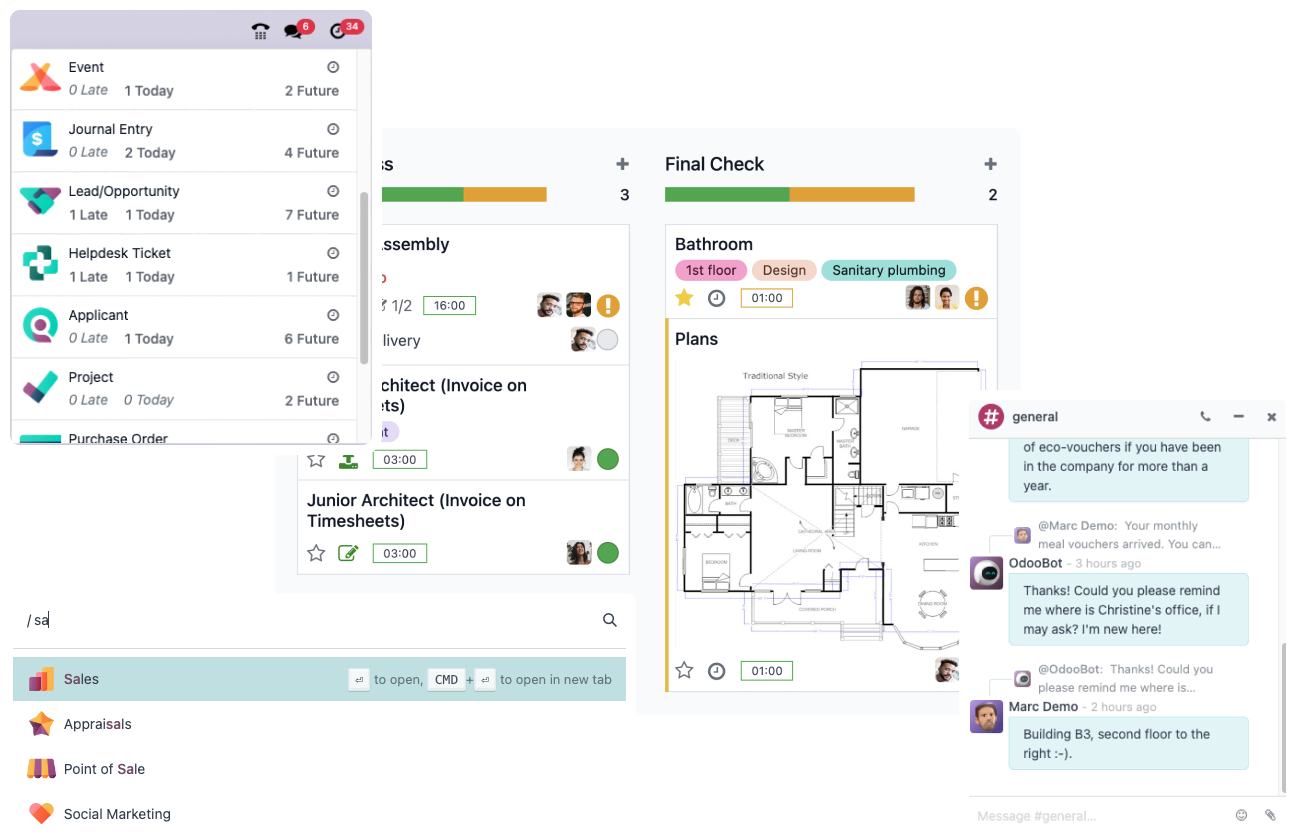
AI isn't a bolt-on. In recent versions it's part of Odoo — it writes emails, answers customers, extracts documents and helps with text right where data is created.
One data source, one truth
AI works over the whole company in one database, not fragments from ten apps. The output is more accurate and, above all, traceable.
Data under your control
Odoo can run on your own server or in the cloud. You decide where data flows and whether it leaves the company at all.
Your own AI over your processes
Use Odoo's native AI, or build your own on top of Odoo — tailored to your processes, not a generic assistant that doesn't know your business.
Fast development, no vendor lock-in
The open-source community moves Odoo forward by leaps. You don't depend on a single vendor or on what a closed system happens to ship.
Odoo 20
AI with the data right in the system
A salesperson dictates in the car what a meeting was about. AI turns it into notes, creates tasks and sends a summary — and it all stays visible in CRM, with the right customer. Not in someone's inbox, not in a separate app.
That's the difference between AI in Odoo and AI in Outlook or Gmail. There an assistant helps write an email, but the result stays outside your data. In Odoo everything flows into the system you run the company from.
- Writes and drafts emails right at the customer in CRM
- Turns a dictated meeting into notes and tasks
- Extracts received documents and readies them for posting
- Answers questions over your data, not the internet
Local AI
AI with you, data with you
Odoo can run on your own server, or in the cloud. Local AI can then run on the same hardware — and your data never leaves the company. For sensitive operations that's a crucial difference.
But mind the reality: if your CRM or other tools already run as a cloud service, your data is long gone outside. Local AI makes no sense there. So the order matters — first unify data into Odoo, then decide whether AI runs with you or outside.

A change that lasts
We understand the worry about changing ERP.
But delay has its price too.
Moving to a new system is a big decision. It touches established work and the whole team. So it's tempting to add AI on top of current apps and get a quick result with less effort. Management gets clearer reports, people find information more easily.
But if the company lacks unified processes, reliable data and clear responsibilities, the cause of the problems stays. AI helps handle the symptoms while rewrites, duplicates and ambiguity carry on.
You'll come back to the question of how to truly unify and run the company anyway.
That's why it makes sense to address AI together with processes and the business system — and build on a foundation that works long-term too.
Can't change your ERP right now? We can still help with AI →What it can look like
From the meeting
straight to the next step.
Draft a reply in the email assistant. In the connected ERP, follow up on the customer, the opportunity and a task for a colleague.
“The customer wants a quote in two variants. They want to decide by the end of the month. Prepare a short summary and a draft email.”
Odoo documents voice transcription, summary and sharing by email. Saving to a specific opportunity and the follow-up steps are verified for your version and setup. The example doesn't promise hands-free voice control of CRM.
Three paths. One foundation.
We start with what Odoo already does.
We extend what adds value.
AI isn't one universal add-on. We pick features and a model by the specific work, data sensitivity and running cost.
AI right in Odoo
Use features built into the environment your team already works in.
- Text and email drafts
- Transcription and summary of voice notes
- Personalised email templates
We verify availability for your version, edition and configuration. AI features exist in Odoo before version 20 too.
Custom AI agents
Connect company rules to concrete steps in Odoo. With clearly defined permissions.
- Email → draft enquiry or quote
- Customer overview before a meeting
- Alert on a deal with no next step
Examples of tailored solutions. Scope and feasibility verified in a pilot.
Local AI model
For selected tasks, processing can be designed within infrastructure you control.
- Control over the data flow
- Your own rules and model operation
- Option to isolate sensitive tasks
Requires a suitable model, hardware and integration. Not an automatic property of native AI features.
Questions that make sense
No empty promises.
Do we have to replace all apps because of AI?
You don't. If current systems serve well and have good interfaces, integration may be the fit. Odoo makes sense where unifying processes brings more benefit than another layer of connections.
What if we already use Odoo?
We start from your current environment. We check data quality, available AI features and pick a specific process for a pilot. A new implementation may not be needed.
Can Odoo send a meeting summary on its own?
The documentation describes transcription, summary and sharing notes by email. The full scenario from dictation to a CRM entry and sending depends on version and configuration. We'll demo the exact flow and set up output review before sending.
Does AI in Odoo mean data stays in Odoo?
Not automatically. Features in Odoo's interface may use an external model provider. So we handle separately where company data is stored and where its AI processing happens. Local operation requires the right integration.
How much does AI cost and when does it pay off?
It depends on the process, model, processing volume and integration complexity. In a pilot we compare time saved and work quality against the cost of setup, operation and ongoing review.
Want AI that actually helps?
We'll go through your processes, tell you where AI makes sense and propose a path — from order in data to deployment. No strings attached.