ERP for agriculture From the field all the way to
the internal period close.

Synwase AGRO connects crop production, livestock, machinery, inventory and finance directly in Odoo. Every field report turns into a cost on the right crop.

LPISland parcels from the Farmer's Portal
Cost/haby field and crop
Ear taganimal value tracked individually
Multi-companyre-invoicing within the group
How data flows through the farm

Enter once. Use everywhere.

A single record from the tractor travels through the whole process without being retyped into other spreadsheets.

1
Fieldsowing and area
2
Work reportpeople and machines
3
Consumptionmaterials and lots
4
Accountingcost centre and period
5
Crop costplot and crop
6
Costingper hectare and tonne
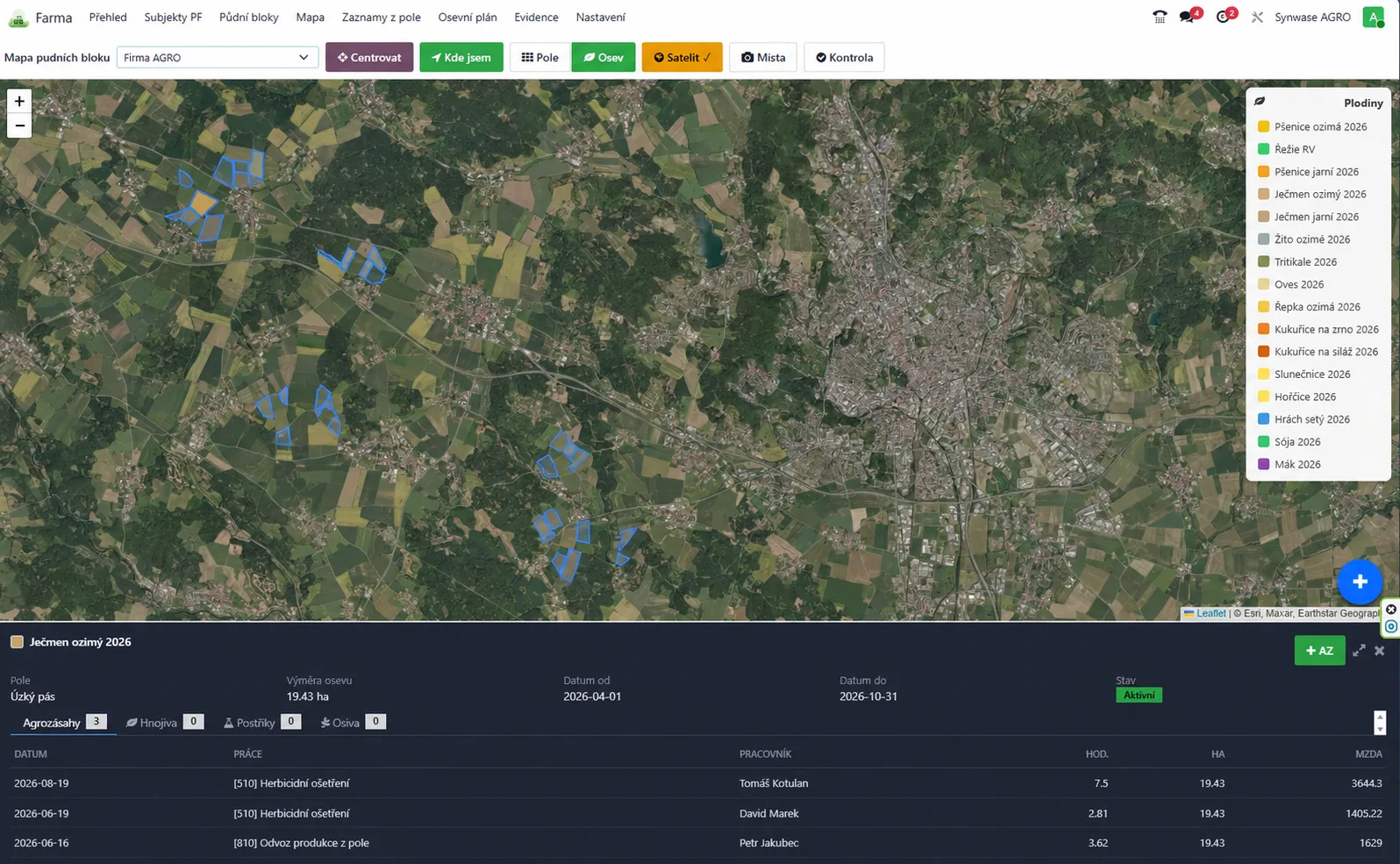
Map of land blocks and crops with LPIS codes in Odoo (demo data)
Work in the field

A work report nobody has to retype

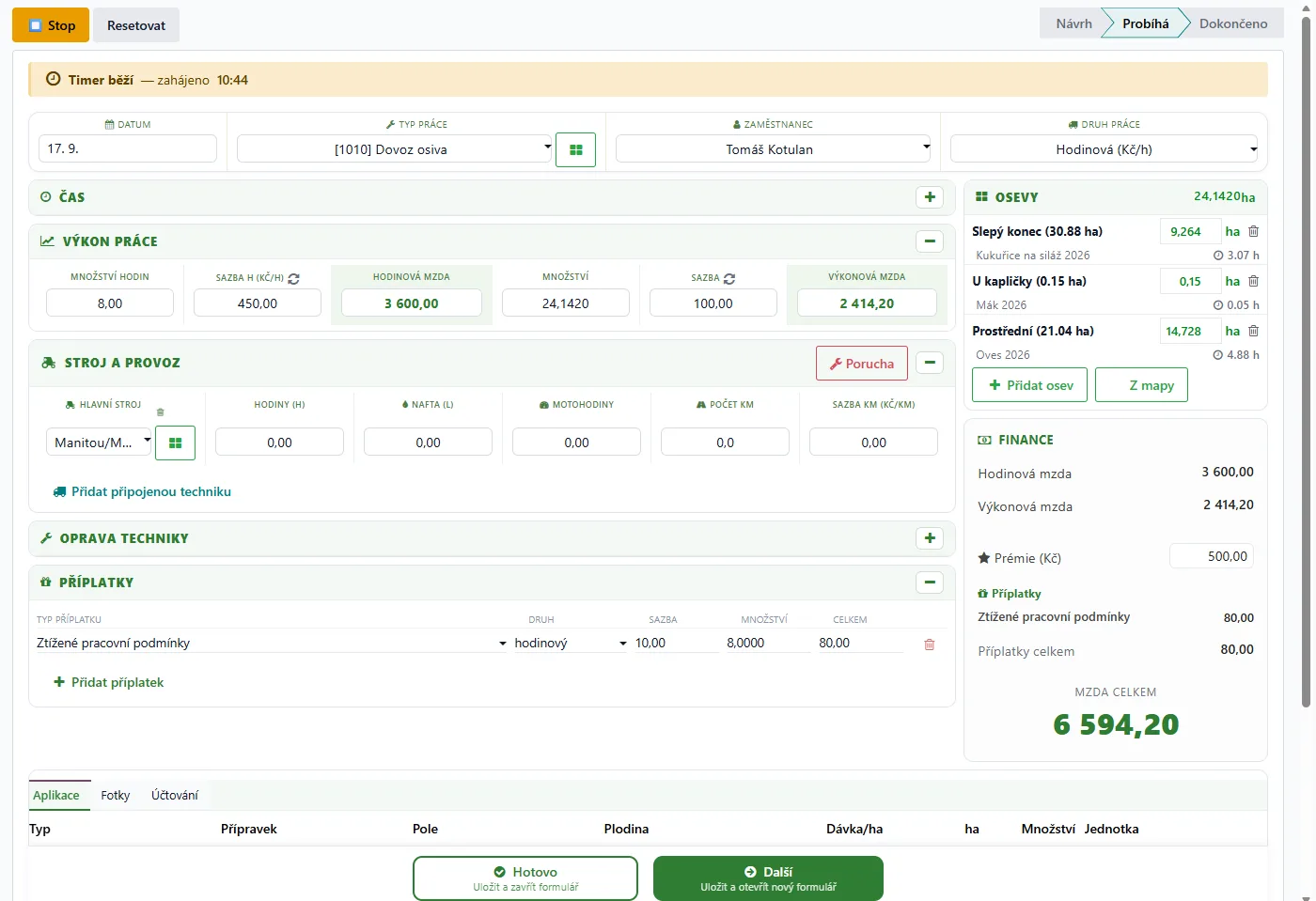
The tractor driver picks the job, field and machine. The system calculates hectares, wages, engine hours and the cost of the specific crop.

→One trip is split across several fields
→A breakdown creates a maintenance request
→Consumption is posted to inventory
Work report in Odoo: crops with area in hectares, machinery and wage calculation
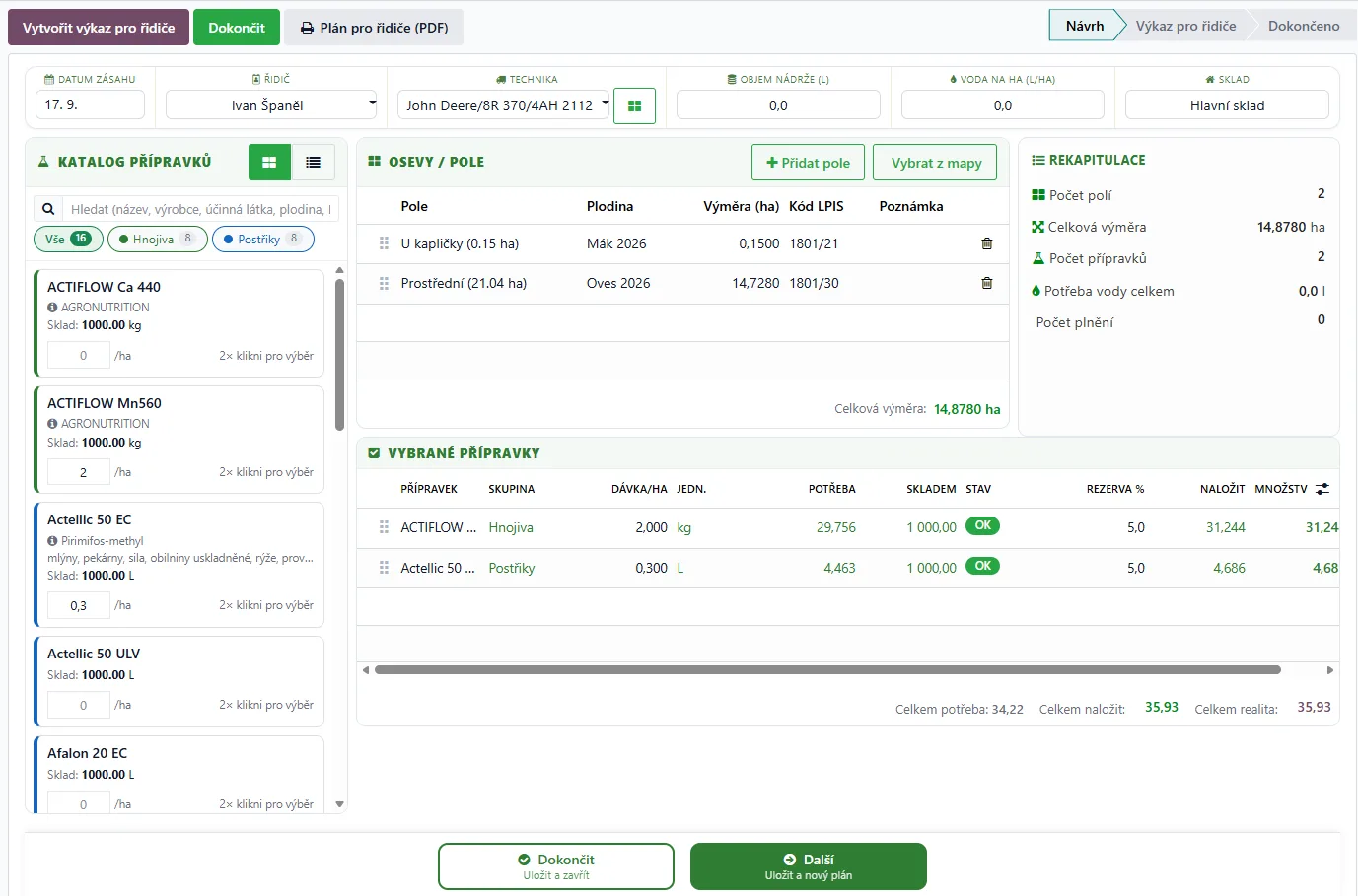
Field treatment plan in Odoo: fertiliser and spray catalogue, fields with LPIS codes and product requirements
From plan to reality

What you plan is exactly what the warehouse issues

The agronomist sets the dose per hectare. Odoo calculates the requirement, checks stock and the storekeeper issues the right lot.

→Available quantity check
→Issue via mobile WMS
→Lot traceability down to the field
Livestock

The herd in categories,
its value in the books

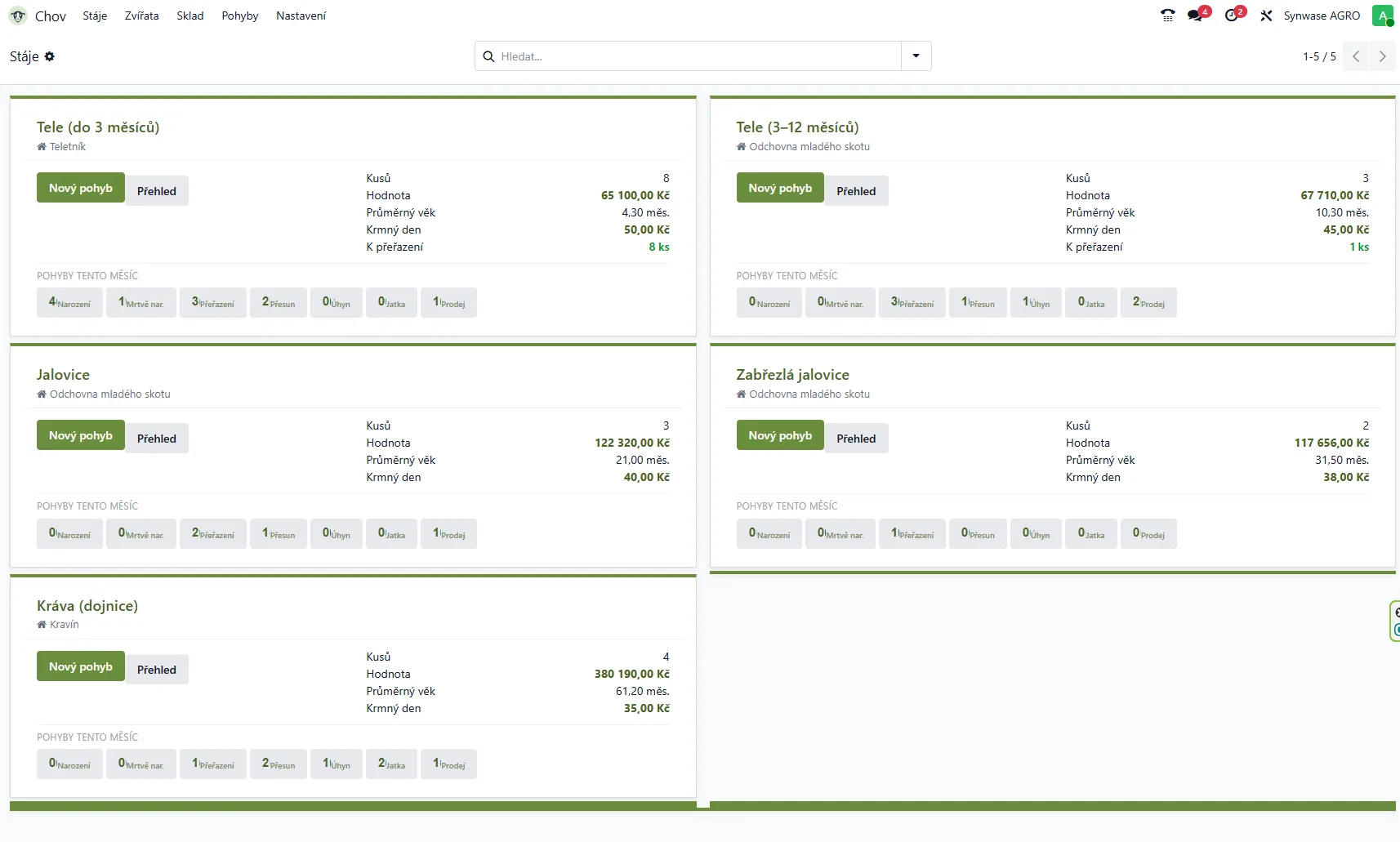
For every category you see the head count, the book value of the herd, the average age, the cost of a feeding day and how many animals are due to move up a category. Monthly movements are broken down into births, category changes, transfers, deaths, slaughter and sales.

We track value by ear tag, not as a category average. Every animal has its own feeding day and its own value — from the purchase price through rearing to the sale.

Cattle records in Odoo: barns and animal categories with head count, value and movements (demo data)
Designed for the field

Works in the tractor. And in the barn.

Large controls, picking a field from the map and scanning an ear tag with the camera. No complicated forms or paper notes.

✓Work a few taps away
✓Photo of a breakdown straight from the cab
✓Bulk animal transfers
Processing and sales

Milk into cheese. Livestock into meat. Harvest into contracts.

Many farms don't stop at primary production. Odoo also covers what comes after harvest and slaughter — weighbridge intake, processing and sales — and the cost stays traceable back to the field or the individual animal.

Harvest contracts

You sell 120 t of wheat on contract. Every truck that leaves is weighed, the weighbridge ticket is deducted from the contract, and you always see how much has been delivered, what remains and at what price.

→Contract with quantity, price and deadline
→Fulfilment truck by truck from weighbridge tickets
→Balance and invoicing based on actual deliveries
The key competitive advantage

Operations end up in the right numbers.

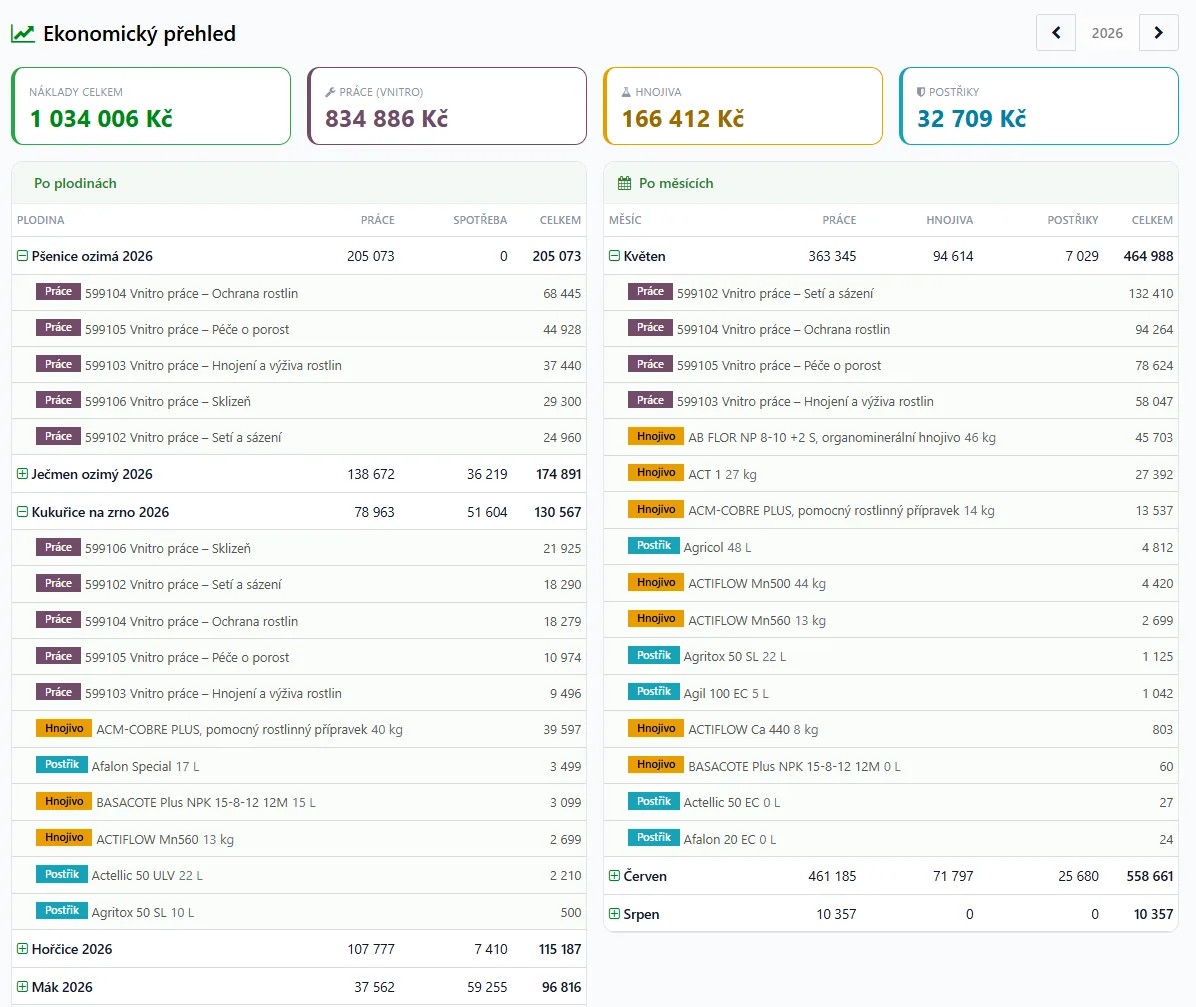
Accounting is not a separate world. Every movement has a field, crop, cost centre and period — so costing happens continuously, not only after the period close.

Accounting and finance in Odoo →
Farm financial overview in Odoo: labour, fertiliser and spray costs by crop and month

Internal transfers

Harvested maize becomes a feed cost in the barn.

Overhead allocation

Workshop and diesel costs are split by actual engine hours.

Work in progress

The cost of winter crops stays in the field until next harvest.

Crop costing

See cost per hectare and per tonne during the season.

Open integrations

What you already use stays

We don't want to replace precision farming or dairy systems — they're better in their field than any ERP. We want their data to flow into accounting, not into Excel.

Farmer's Portal

State registry

Transfer of the land register (LPIS) and supporting data for applications and reports. No entering land in two places.

CleverFarm

Precision farming

Machine telemetry, work output and sensor data arrive as field operations with costs on the right plot.

AG info and GC úpravy

Agronomy software

Agronomic records and work plans stay in the system your agronomists know. Consumption and output flow into Odoo.

Dairy systems

Collection and purchasing

Collection, quality and deduction data are matched with deliveries and invoicing. Nobody retypes milk volumes.

Fuel stations

Diesel dispensing

Withdrawals from your own or a partner station go to the machine and driver card, and from there to the field cost.

Scales and weighbridge tickets

Harvest and dispatch

A weighbridge ticket becomes a document in Odoo — at harvest intake and at dispatch to the processor.

FAQ

What farmers ask us most often

Do we have to stop using the Farmer's Portal or our agronomy software?

No. Land parcels and crops are taken over from the LPIS register, and data from agronomy systems keeps flowing into Odoo. Agronomists stay in the tools they know, while consumption and work output flow into the finances. We agree on how to connect based on the systems you use.

Does Odoo handle Czech and Slovak legislation and accounting?

Yes. We deploy Odoo with Czech or Slovak localisation: VAT, control statements and financial statements. Internal cost accounting and crop costs build directly on it.

Czech and Slovak Odoo localisation →

How is stock of fertilisers, seed and crop protection products managed?

By lot. The treatment plan calculates the requirement from the dose per hectare, checks stock and the storekeeper issues a specific lot from a mobile device. For every field you can trace what went onto it.

Inventory and logistics in Odoo →

How are work reports entered out in the field?

On a phone. The tractor driver picks the task, machine and field from the map; the stockman scans the ear tag with the phone camera. The report goes straight into inventory, payroll and crop costs.

Does Odoo work for a group of several farming companies?

Yes. Each company keeps its own accounting, master data is shared and an invoice issued by one company is automatically created as a bill in its sister company. Typical cases are central purchasing of seed, fertiliser and materials or re-invoicing machinery and staff.

Do we have to roll out everything at once?

No. Most farms start with one area, such as land records and work reports or finance, and add the rest step by step. The data connects as soon as each part goes live.

We'll show it on your farm.

Bring a few real documents, a field work report or a land overview. In 30 minutes we'll show you the actual flow of data.

Led by an Odoo implementer
We'll also tell you what Odoo can't do
Part of the project may qualify for a grant