
Cashflow automation in Odoo.
See your cash weeks ahead.
A Synwase extension that builds the expected cash development from invoices, payables and planned payments. It warns about risky periods, shows the structure of inflows and outflows and lets you simulate scenarios — before a crisis hits.
Dashboard
Your entire cashflow
on one screen.
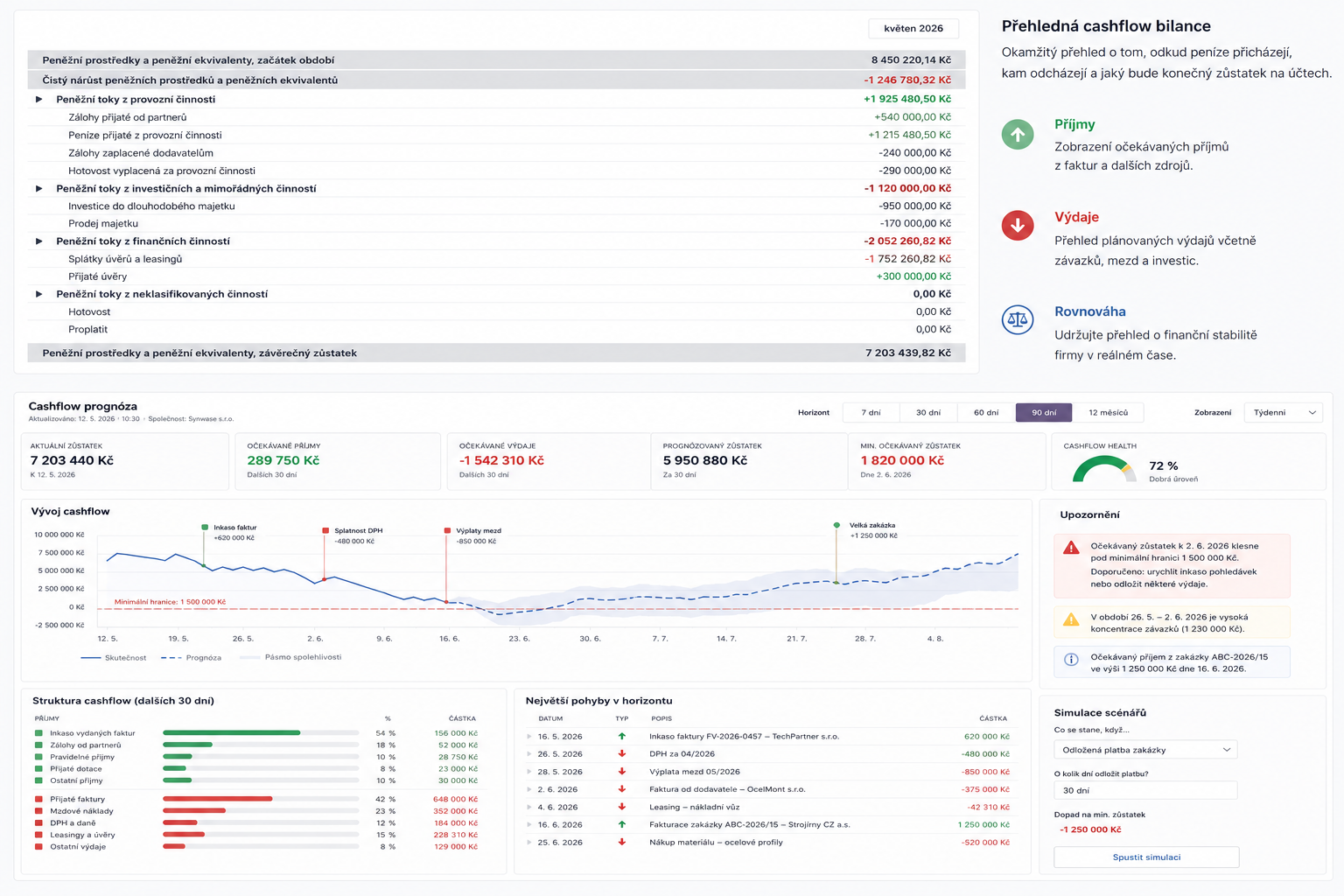
KPI cards show the current balance, expected inflows and outflows, the forecast balance at the horizon and the minimum expected balance — including the date it occurs.
The cash development chart combines actuals, forecast and a confidence band. Key events — invoice collections, VAT due dates, payroll or a large order — appear directly on the timeline.
- ✓ Horizon of 7 / 30 / 60 / 90 days and 12 months
- ✓ Daily, weekly and monthly views
- ✓ Minimum balance threshold directly in the chart
- ✓ Cashflow health — a financial health score
Alerts and risks
Know about risk
before it happens.
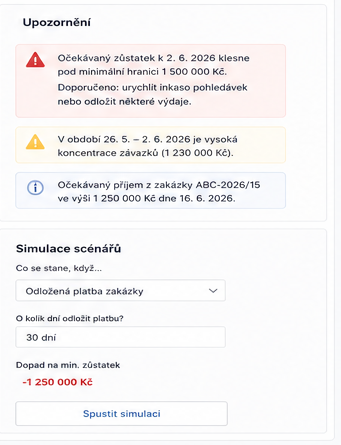
The module watches the forecast balance against a minimum threshold you set. When the balance is about to drop below it, you get an early warning with a recommended action — speed up collections or postpone some payments.
You also see periods with a high concentration of payables and expected large inflows from orders — so you know not just that it will be tight, but why and what to do about it.
- ✓ Warning before dropping below the minimum threshold — with a date
- ✓ Periods with high concentration of payables
- ✓ Expected large inflows from orders
- ✓ Concrete recommendations how to handle the risk
What the module does
From cashflow structure to scenario simulation.
Everything is computed from live Odoo data — open invoices, payables, bank and planned payments. No Excel exports.
Cashflow structure
Inflows and outflows for the next 30 days broken down by type — invoice collections, deposits, grants, vendor bills, payroll, VAT and leases.
Largest movements
A chronological list of the largest expected payments in the horizon. You know what moves your cash the most and when.
Scenario simulation
What happens if a customer pays 30 days late? The impact on your minimum balance is two clicks away.
Clear cashflow statement
A cash flow statement structured into operating, investing and financing activities — broken down to individual items.
Three forecast scenarios
Optimistic, realistic and pessimistic forecasts based on the real payment behaviour of your customers.
Native Odoo connection
Data straight from invoices, payables and bank statements. The forecast is always current — no manual re-entry.
How we set it up
Cashflow automation in three steps.
The forecast is only one part. For it to hold, the money has to actually arrive — so we set up reminders and payment matching alongside it.
1. Cash forecast
You set the horizon (7, 30, 60 or 90 days, or 12 months) and the minimum balance you don't want to fall below. The module then reads open customer invoices, vendor bills, bank balances and planned payments straight from Odoo and calculates three scenarios based on how your customers actually pay — not on the invoice due date.
2. Automated reminders
In Odoo under Accounting → Configuration we set up follow-up levels: how many days after the due date the first email goes out, when the second follows, and when a task is created for a salesperson instead. Odoo then sends them on its own and the forecast shows which receivable is at which stage.
3. Bank payment matching
Bank statements reach Odoo by import or a direct bank connection. Matching rules pair a payment with its invoice by reference and amount, leaving only exceptions to handle manually. The balance in the forecast is therefore always current and nothing gets retyped into Excel.
Want to see your cashflow ahead of time?
We'll show you the Cashflow forecast module live — online, in 30 minutes, free and with no commitment.